Computer Science Assignment
What is Computer ?
A computer is
a general purpose device that can be programmed to carry out a finite set of arithmetic or
logical operations. Since a sequence of operations can be readily changed, the
computer can solve more than one kind of problem.

1.Features of Computers
There
are many kinds of computers, from the familiar desktop computer to the business
or scientific mainframe to the thousands of different, specialized computers
such as the ones found today in automobiles and cell phones. All computers have
a few operational features in common.
Input: There is a way to
direct or inform the computer. Examples are the keyboard and mouse, removable
disks, as well as external instruments or networks.
Processing: The computer has a
processing area that can do work. The CPU, or central processing unit, can be
designed or instructed to perform any number of different tasks.
Output: There is a way the
computer can export results. Examples are video monitors, speakers, removable
disks, instruments, or networks.
Most computers also have one or more ways of storing information
within.
Memory: One type of memory
(RAM: random-access memory) can retain information for the computer's own use
while processing data; another kind (ROM: read-only memory) can hold necessary
reference information even while the computer is off.
Storage: Typically onboard
disk or nonvolatile RAM.
Following
are the Important features of PC (computer)
- Processor
- speed
- reliability
- accuracy
- automation
- diligence
- consistency
- no.feelings
- Random
access memory (RAM)
- Operating
system
- Graphics
adapter and video RAM
- Monitor
2.Generation Of Computers

FEATURES OF FIRST GENERATION
1. Use of
vacuum tubes
2. Big
& Clumsy
3. High
Electricity Consumption
4.
Programming in Mechanical Language
5. Larger
AC were needed
6. Lot of
electricity failure occured
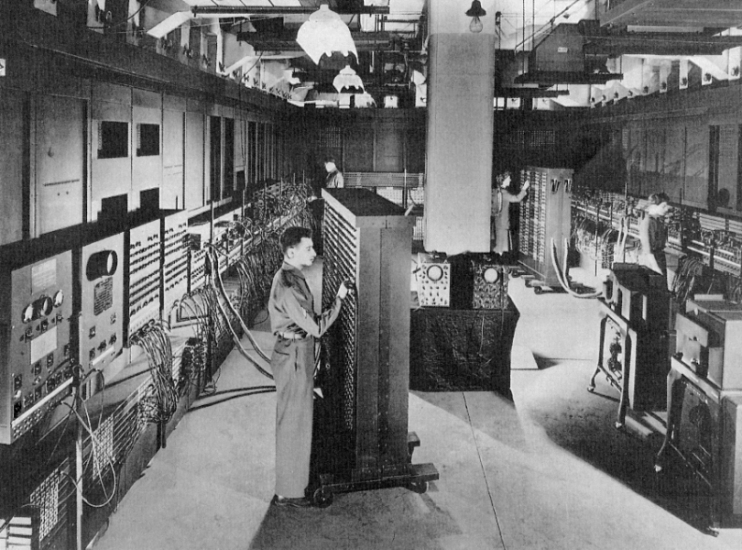
First Generation Computer
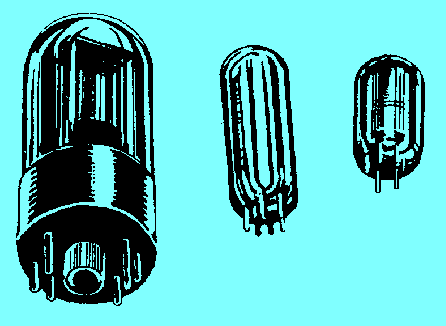
Vacuum Tube
FEATURES OF SECOND GENERATION
1.
Transistors were used
2. Core
Memory was developed
3. Faster
than First Generation computers
4. First
Operating System was developed
5.
Programming was in Machine Language & Aseembly Language
6. Magnetic
tapes & discs were used
7.
Computers became smaller in size than the First Generation computers
8.
Computers consumed less heat & consumed less electricity
Second Generation Computers


THIRD GENERATION FEATURES
1.
Integrated circuits developed
2. Power
consumption was low
3. SSI
& MSI Technology was used
4. High
level languages were used
Third Generation Computers


FOURTH GENERATION COMPUTERS
1. LSI
& VLSI Technology used
2.
Development of Portable Computers
3. RAID
Technology of data storage
4. Used in
virtual reality, multimedia, simulation
5.
Computers started in use for Data Communication
6.
Different types of memories with very high accessing speed & storage
capacity
Fourth Generation Computers


FIFTH GENERATION COMPUTERS
1. Used in
parallel processing
2. Used
superconductors
3. Used in
speech recognition
4. Used in
intelligent robots
5. Used in
artificial intelligence
Fifth Generation Computers

3. Personal computer
Ans.
A personal computer (PC) is any
general-purpose computer whose size, capabilities, and original sales
price make it useful for individuals, and which is intended to be operated
directly by an end-user with no intervening computer operator. This
contrasted with the batch processing or time-sharing models which
allowed larger, more expensive minicomputer and mainframe systems
to be used by many people, usually at the same time. Large data processing
systems require a full-time staff to operate efficiently.
Personal Computers
4. Workstations
Ans. A type
of computer used for
engineering applications (CAD/CAM), desktop
publishing, software development, and other types of applications
that require a moderate amount of computing power and relatively high
quality graphics capabilities.
Workstations generally come with a
large, high-resolution graphics screen, at least 64 MB (megabytes)
of RAM, built-in network support, and a graphical user
interface. Most workstations also have a mass
storage device such as adisk drive, but a special type of
workstation, called a diskless workstation, comes without a disk drive.
The most common operating systems for workstations
are UNIX and Windows NT.
In terms of computing power, workstations lie
between personal computersand minicomputers, although the line is
fuzzy on both ends. High-end personal computers are equivalent to low-end
workstations. And high-end workstations are equivalent to minicomputers.
Computers At Work Stations


5.Mainframe computers
Ans. A very large and
expensive computer capable of supporting hundreds, or even thousands,
of users simultaneously. In the hierarchy that starts with a
simplemicroprocessor (in watches, for example) at the bottom and moves
tosupercomputers at the top, mainframes are just below supercomputers. In
some ways, mainframes are more powerful than supercomputers because
they support more simultaneous programs. But supercomputers can executea
single program faster than a mainframe. The distinction between small
mainframes and minicomputers is vague, depending really on how the
manufacturer wants to market its machines.
Mainframe Computers


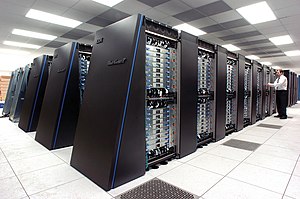
6.Super computers
Ans.The fastest type of computer. Supercomputers are very
expensive and are employed for specialized applications that require
immense amounts of mathematical calculations. For example, weather forecasting
requires a supercomputer. Other uses of supercomputers include
animated graphics, fluid dynamic calculations, nuclear energy research,
and petroleum exploration.
The chief difference between a supercomputer and
a mainframe is that a supercomputer channels all its power
into executing a few programs as fast as possible, whereas
a mainframe uses its power to execute many programs concurrently.


Super Computers

7.Computer
Applications
7.1. Data Processing
Ans. Data processing involves a
number of transactions and file maintenance in order to provide a database for
generating and providing information to users at management levels. Computers
are used to make these transactions and processing simpler. However, there is a
proper procedure that is adopted to generate the desired results.


Computers in Data Processing Cycle

7.2.Information processing
Ans. The following paragraphs describe some components of
information processing that have analogies in human thinking.
· Sensory
register. Computers have
to get their initial input from somewhere outside the computer. This
information may be registered at the keyboard, through a modem, or in some
other manner. It stays in this temporary register area for only a few
nanoseconds before it is moved into the computer's random access memory.
· Working
memory. The random access
memory (RAM) corresponds to the human working memory. This is the electronic
area where the computer combines, integrates, and generates output from data
that are brought in through input devices or are retrieved from read only
memory (ROM) or from a storage area.
· Long-term
memory. Data can be
stored on disk or programmed into ROM for relatively permanent storage. This
information is available to interact with the information in RAM whenever the
program requires it.
· Forgetting. If a program is defective, it may not be
possible to retrieve information. Failure to retrieve information may occur
because the program stored the data incorrectly or because the program is not
correctly designed to retrieve information that was properly stored.
Computer in Information Processing Cycle


7.3.Commercial
Ans. Computer innovation is one of the major scientific developments of
20th century and very will running with more prospects and developments into
the 20th century. In fact, a computer application has made its entry in all the
areas of and fields of human development. Human development impact is
correlated with our legation and in turn religion is directly applied to the
applications of scientific developments. Through computer was innovated during
the late 1950’s the major impact of which has felt in real life during 1980’s.
Computer banking starts from the very basic. When a customer steps
into the bank all entries are made with electronic recording. The debits as
digital mode each and every customers name address, nominee details etc are
recorded in the computer and in fact the photos and signature of the individual
are also being maintained under the scan system for easy verifications and the
identifications of the individuals. The drafts electronic money transfer
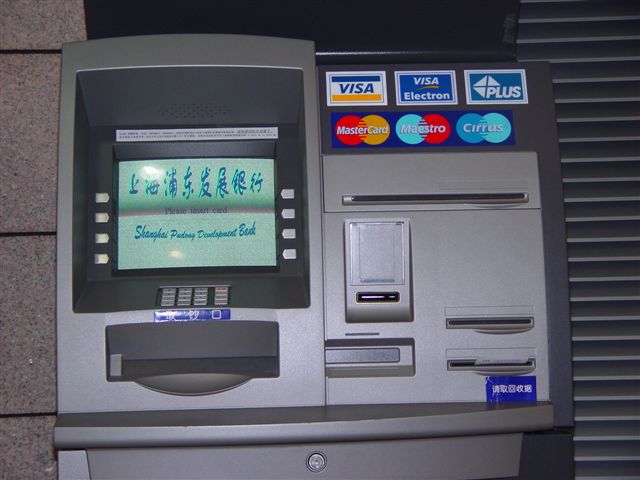
advises to other banks are all managed through the electronic teller machine
(ATM) is of great advantage to the customers. This ATM has made customers wait
drastically reduced waiting in long ques. The advantage of ATM debit cards,
credit cards facilities have also made customers life easier. By resorting to
electronic banking credit cards reduce carrying money and cut the burglary risk.


Computers in Commercial Banks
7.4.Office automation
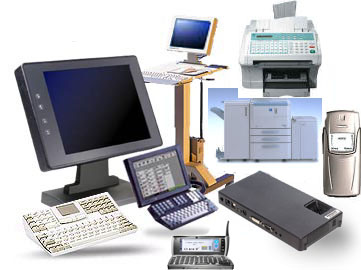
Ans. Office automation
refers to the integration of office functions usually related to managing
information. There are many tools used to automate office functions and the
spread of electronic processors inside computers as well as inside copiers and
printers is at the center of most recent advances in office automation. Raw
data storage, electronic data transfer, and the management of electronic
business information comprise the basic activities of an office automation
system.


Computers in Office automation

7.5.Industry and engineering
Ans. Industrial engineering is one of the earliest fields to utilize
computers in research, education, and practice. Over the years, computers and
electronic communication have become an integral part of industrial engineering.
The journal aims at
an audience of researchers, educators and practitioners of industrial
engineering and associated fields. It publishes original contributions to the
development of new computerized methodologies for solving industrial
engineering problems, and applications of these methodologies to problems of
interest to the broad industrial engineering and associated communities. It
encourages submissions that expand the frontiers of the fundamental theories
and concepts underlying industrial engineering techniques. It also serves as a
venue for articles evaluating the state of the art of computer applications in
various industrial engineering and related topics, and research in the
utilization of computers in industrial engineering education. Papers reporting
on applications of industrial engineering techniques to real life problems are
welcome, as long as they satisfy the criteria of originality in the choice of
the problem and the tools utilized to solve it, generality of the approach for
applicability to other problems, and significance of the results produced. A
major aim of the journal is to foster international exchange of ideas and
experiences among scholars and practitioners with shared interests all over the
world.


Computers in Industry and engineering


7.6.Healthcare
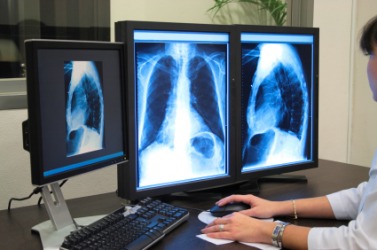
Ans. Advances in
hardware and software development have allowed more and better techniques in
order to building applications in the health area, by using computational
concepts and methods. On the other hand, this area also has searched for
computational aids, providing new topics of investigation and, consequently,
demanding new computational techniques development. In general, the
applications explore different domains of computer science, like database,
image processing, distributed systems, graphics computer, virtual reality,
software engineering, among others. Also the applications integrate several new
techniques to construct systems like Computer Aided Diagnosis, Information
Visualization, Computer Aided Surgery, Telemedicine, Procedures Simulation and
Phobias Treatments.
The track “Computer Applications in Health” of SAC2008 aim to provide a space for discussion and experience exchange for researchers, students, professors and professionals that are interested in the development of this area. Topics of interest include the following, but not exclusively:
The track “Computer Applications in Health” of SAC2008 aim to provide a space for discussion and experience exchange for researchers, students, professors and professionals that are interested in the development of this area. Topics of interest include the following, but not exclusively:
· Artificial Intelligence in
Health
· Computer Aided Diagnosis
· Database in Health
· Decision support systems
· Evidence-based health care
· Human-Computer Interaction in
Health
· Information Systems and PACS
· Medical Education
· Multimedia in Health
· Other computer application in
health care.
· Signal and Image Processing in
Health
· Software Engineering in Health
· Telemedicine
· Virtual and Augmented Reality
in Health
· Web Applications in Health


Computers in Industry and engineering


7.7.Education
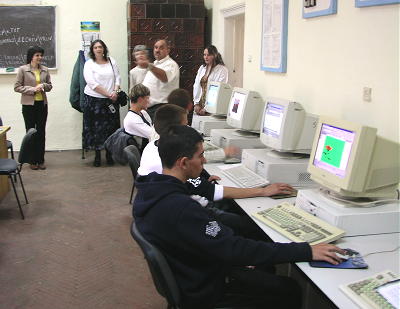
Ans. A computer helps to
manipulate data according to a list of instructions, called a program. It can
save a lot of data and produce the same, instantly. It is also called a
universal information-processing machine. It is a common operating system used
in corporate businesses, educational organizations and many research programs.
The computer technology has been used proficiently in various educational
fields. There are many professional courses that program their curriculum on
computers. It enables the students and teachers to methodically study or
conduct classes.
Most schools
highlight the importance of computer education. They provide computer education
to children, at a very young age. It helps them to learn and develop interest
in the basics of computers. The main purpose is to make them comfortable using
the system, as the future holds a bright promise for the technology. Many
students become proficient and plan to pursue careers in the world of computers.
Computers are used
in running school and college administrations, during the admission procedures,
storing of official and student records. They are also used in syllabus
planning and decision-making, controlling, assisting instructions and
simulation. Computers are helpful in directing aptitude tests and achievement
tests, at the time of entrance exams. There is computer software designed to
process performances related to teachers and employees promotion avenues. They
also process records of salaries, examinations, schemes of examination,
printing of papers and question papers, evaluation of answer sheets, mark
sheets and certificates.
Computers are used
in colleges, by the professors, to conduct special classes and enable their
students to adopt a methodical way of study. Students take more interest in the
documented programs, designed on different topics. Internet has provided a
favorable means of pursuing courses from renowned universities, across the
world. These facilities become available at a click of the mouse.
Computers in Education



7.8. Graphics and multimedia
Ans. In the Computer and Multimedia Graphics option, students will:
- Be exposed to a dual
platform for graphics so you will have experience in both PC and Macintosh
environments.
- Be introduced to
communication technologies, philosophy of reproduction choices, methods of
printing, photography and darkroom applications, electronic publishing,
presswork, screen printing and other non-print communications.
- Use electronic equipment
and software for the preparation of copy, including deign, editing, and
typography.
- Acquire and edit digital
images. The digital still camera and its operation are stressed
along with computer image editing software.
- Be introduced to
multimedia software, hardware, the integration of text, technical
graphics, sound, animation, webpage design, and CD/DVD publishing.
- Be introduced to the
digital video camera and video editing suite, and produce personal and
corporate videos in individual and group settings.
- Be exposed to the
following software:
- Dreamweaver
- Director
- Flash
- Fireworks
- Freehand
- Illustrator
- InDesign
- PhotoShop
- Premiere
- Insight
- Maya
- Microsoft FrontPage
- Final Cut Pro
- Sound Editing Software such as Cake Walk and Acid Works
Computers in Graphics and multimedia


8.1. Classification of computers
according to size


Ans. They can also be
classified in different ways like classification of computers by size.
· Super computer
Super computers can process huge amounts of data, The biggest in size, the most expensive in price than any other is classified and known as super computer. It can process trillions of instructions in seconds. This computer is not used as a PC in a home neither by a student in a college. Governments specially use this type of computer for their different calculations and heavy jobs. Different industries also use this huge computer for designing their products. In most of the Hollywoods movies it is used for animation purposes. This kind of computer is also helpful for forecasting weather reports worldwide.
Super computers can process huge amounts of data, The biggest in size, the most expensive in price than any other is classified and known as super computer. It can process trillions of instructions in seconds. This computer is not used as a PC in a home neither by a student in a college. Governments specially use this type of computer for their different calculations and heavy jobs. Different industries also use this huge computer for designing their products. In most of the Hollywoods movies it is used for animation purposes. This kind of computer is also helpful for forecasting weather reports worldwide.
· Mainframes
Another giant in computers after the super computer is Mainframe, which can also process millions of instructions per second and is capable of accessing billions of data. This computer is commonly used in big hospitals, air line reservation companies, and many other huge companies prefer mainframe because of its capability of retrieving data on a huge basis.
Another giant in computers after the super computer is Mainframe, which can also process millions of instructions per second and is capable of accessing billions of data. This computer is commonly used in big hospitals, air line reservation companies, and many other huge companies prefer mainframe because of its capability of retrieving data on a huge basis.
This is normally to
expensive and out of reach from a salary-based person who wants a computer for
his home. This kind of computer can cost thousands of dollars.
· Minicomputer
This computer is next in line but offers less than mainframe in work and performance. These are the computers which are mostly preferred by the small type of business personals, colleges, etc.
This computer is next in line but offers less than mainframe in work and performance. These are the computers which are mostly preferred by the small type of business personals, colleges, etc.
· Personal computers
Almost all the computer users are familiar with the personal computers. They normally know what the personal computer is and what are its functions. This is the computer mostly preferred by the home users. These computers are lesser in cost than the computers given above and also, small in size; they are also called PCs in short for Personal computers.
Almost all the computer users are familiar with the personal computers. They normally know what the personal computer is and what are its functions. This is the computer mostly preferred by the home users. These computers are lesser in cost than the computers given above and also, small in size; they are also called PCs in short for Personal computers.
This computer is
small in size and you can easily arrange it to fit in your single bedroom with
its all accommodation. Today this is thought to be the most popular computer in
all.
· Notebook computers
Having a small size and low weight the notebook is easy to carry to anywhere. A student can take it with him/her to his/her school in his/her bag with his/her book. This is easy to carry around and preferred by students and business people to meet their assignments and other necessary tasks.
Having a small size and low weight the notebook is easy to carry to anywhere. A student can take it with him/her to his/her school in his/her bag with his/her book. This is easy to carry around and preferred by students and business people to meet their assignments and other necessary tasks.
The approach of
this computer is also the same as the Personal computer. It can store the same
amount of data and having a memory of the same size as that of a personal
computer. One can say that it is the replacement of personal desktop computer.
8.2. Classification of computers
according Features(Technology)
Ans. Different types of
computers process the data in different manner. According to the basic
data-handling techniques, computers can be classified into three
categories: analog, digital and hybrid.
·
Analog
Computers:-A computing machine that operates on data in the form of
continuously variable physical quantities is known as analog computer.
These computers do not deal directly with the numbers. They measure continuous
physical magnitudes (e.g. temperature, pressure and voltage), which are
analogous to the numbers under consideration. For example, the petrol pump may
have an analog computer that converts the flow of pumped petrol into two
measurements: the quantity of petrol and the price of that quantity.
·
Digital
Computers:-A computer that operates with information, numerical or otherwise,
represented in a digital form is known as digital computer. Such computers
process data (including text, sound, graphics and video) into a digital value
(in 0s and 1s). In digital computers, analog quantities must be converted into
digital quantity before processing. In this case, the output will also be
digital. If analog output is desired, the digital output has to be converted
into analog quantity. The components, which perform these conversions, are the
essential parts or peripherals of the digital computer.
·
Hybrid
Computers:-Hybrid computer incorporated the measuring feature of an analog
computer and counting feature of a digital computer. For computational
purposes, these computers use the analog components and for the storage of
intermediate results, digital memories are used. To bind the powers of analog
and digital techniques, that is, analog to digital and digital to analog, the
hybrid computers comprehensively use converters. Such computers are broadly
used in scientific applications, various fields of engineering and industrial
control processes.
8.3. Classification of computers
according latest versions of operating systems of computers.


Ans. Operating system
types
As computers have progressed and developed so have the operating
systems. Below is a basic list of the different operating systems and a few
examples of operating systems that fall into each of the categories. Many
computer operating systems will fall into more than one of the below categories.
· GUI - Short for Graphical
User Interface, a GUI Operating System contains graphics and icons and is
commonly navigated by using a computer mouse. See the GUI definition for a
complete definition. Below are some examples of GUI Operating Systems.
 o System 7.x
o Windows 98
o Windows CE
· Multi-user - A multi-user
operating system allows for multiple users to use the same computer at the same
time and different times. See the multi-user definition
for a complete definition for a complete definition. Below are some examples of
multi-user operating systems.
o Linux
o Windows 2000
o Unix
· Multiprocessing - An
operating system capable of supporting and utilizing more than one computer
processor. Below are some examples of multiprocessing operating systems.
o Linux
o Unix
o Windows 2000
· Multitasking - An
operating system that is capable of allowing multiple software processes to run
at the same time. Below are some examples of multitasking operating systems.
· Multithreading - Operating
systems that allow different parts of a software program to run concurrently.
Operating systems that would fall into this category are:
Common questions and answers to operating systems in general can be
found on the below operating
system question and answers. All other questions relating to an
operating system in particular can be found through the operating system page.

· IBM OS/2 Warp
· Windows CE
· Windows 3.x
· Windows 95
· Windows 98
· Windows 98 SE
· Windows ME
· Windows NT
· Windows 2000
· Windows XP
· Windows Vista
· Windows 7
9.1. Configuration of their own computers.

Ans. If one is buying a computer for the first time,
the product features and specifications could be too confusing. This is why it
is preferable to first know the basics of computer
configuration before planning to go to a computer store to get one. It
will be more economical and will cause lesser problems and headaches from
additional costs in the future. But why waste time reading all these things
about computers if money is not an issue.
There are a lot of computers being sold in the market with
great computer configuration. However, these computers could cost way more
expensive than the ones which can be configured by oneself. Some people, in
fact, decide to assemble computers for themselves. This let them save a lot
more than buying a pre-assembled unit sold in stores. They could also choose
the best parts that they want their computer to have.
But, again, if budget is not an issue, one can get a high-end computer
from the trusted high-end brands. These will certainly have the
best computer configurationas specified in the product specifications
which will suit a usual person’s needs.
There is also a choice of buying a desktop or a laptop computer. Although desktops tend to have higher specifications than laptops since the latter can be upgraded, there are some laptops with better performance than some desktops. And as laptops can not be upgraded as much as a desktop, these are usually sold with the best computer configuration of that time. Laptops are getting more powerful and for functional in terms of performance every passing year.
There is also a choice of buying a desktop or a laptop computer. Although desktops tend to have higher specifications than laptops since the latter can be upgraded, there are some laptops with better performance than some desktops. And as laptops can not be upgraded as much as a desktop, these are usually sold with the best computer configuration of that time. Laptops are getting more powerful and for functional in terms of performance every passing year.
9.2. Configuration of their own laptops


Ans. A laptop is purchased with the ability to be configured with many
different settings for security, memory, speed or other options.
Follow these steps to learn how to properly configure your laptop for a
variety of settings.
· Configure your laptop for security by making a
startup password. Press the power button on your laptop, press the
"F2" key and hold down "Alt" while pressing "P"
to scroll through the pages. Find the page titled "System Security."
Use the left and right arrow keys to modify values. Change the primary password
to "Enabled," enter a password and push "Esc" to exit and
confirm your password.
· Set and configure your laptop speed. Speed up
your laptop by upgrading your RAM. If you upgrade your RAM from 512MG to 1GB
your speed can be boosted 13 percent and you lose only 8 minutes of battery
power.
· Boost your laptop's speed even more by
installing a high-end hard drive. If you upgrade from a 4,200 rpm drive to a
5,400 rpm drive, you acquire an 18 percent increase in speed and only a 7
minute decrease in the life of your battery.
· Opt for a 2.13G Hz Pentium M CPU if you're
working with multimedia. The hard drive should be 60GB and 5,400 rpm. You need
at least 1G of RAM.
· Perform a DHCP configuration on Windows XP.
Click "Start," "Control Panel," "Network and Internet
Connections" and "Network Connections." Select "Local Area
Connection," "Change Settings of This Connection,"
"Internet Protocol," "Properties," and then check the boxes
for "Obtain an IP Address Automatically" and "Obtain DSN Server
Address Automatically." Click "OK" twice.
9.3. Configuration of their own notebook

Ans.
Hardware Description
· Brand/Model: Lenovo ThinkPad
X200
· CPU: Intel Core2 Duo P8700,
2.5GHz
· RAM: 2GB DDR3
· Hard Disk: 160GB or above
· Display:12.1”, 1280x800
· Weight: 1.4kg
· Dimension: 20.7-35.5 x 295 x
210 mm
· Built-in Wireless LAN Network
Card
· Built-in sound system
Pre-installed Software
· MS Windows 7 Enterprise with SP1
· MS Office 2010 Professional Plus
· Windows 7 Multi-Language Pack –
Simplified and Traditional Chinese
· Office 2010 Professional Plus
Multi-Language Pack – Simplified and Traditional Chinese
· Windows Media Player 11
· Acrobat ReaderX 10
· Macfee Virus Scan Enterprise
8.7.0i with ePO
· RealPlayer 15
· Flash player 11 and Shockwave
11.6
· QuickTime 7.7.1
· Lenten Software Reborn
By Rohith.B.P, BBM 1st Sem, B section

No comments:
Post a Comment